Free WordPress plugin · WooCommerce + Reckon One
Every WooCommerce order, invoiced in Reckon One. Automatically.
SparxSync turns your WooCommerce orders into matching Reckon One invoices in the background, with the right customer, accounts and GST codes, to the cent. No more typing orders into your books.
100% free, no paid version
Built for Australia & New Zealand
Works with HPOS
No tracking
Why stores switch
Stop retyping orders into your accounts.
Copying sales from WooCommerce into Reckon One by hand is slow, and every typo turns into a reconciliation headache later.
Before
Hours of manual data entry
Every order becomes an invoice someone has to create by hand: customer, lines, GST and totals.
Before
Totals that don’t match
Rounding, shipping and tax add up differently, so the books and the store never quite agree.
Before
Duplicates and missed orders
Was that order already entered? Without a reliable link between the two, it’s easy to enter it twice or not at all.
How it works
Set it up once. Then forget about it.
A guided checklist walks you through setup. Synchronisation stays off until everything is green.
01
Connect Reckon One
Enter your Reckon API credentials and sign in securely with OAuth 2.0. Credentials can also live in wp-config.php.
02
Map accounts and GST
Choose your Reckon book, your sales, shipping and fee accounts, and the Reckon tax code for each WooCommerce tax rate.
03
Turn on sync
When an order reaches Processing or Completed, its invoice is created in Reckon One in the background. Checkout is never slowed down.
Features
Everything you need. Nothing that touches your books unexpectedly.
Built for store owners, bookkeepers and accountants who want WooCommerce and Reckon One to agree, every time.
Automatic invoices
Finds or creates the Reckon customer, then creates one invoice whose lines, tax and total match the order exactly.
Duplicate protection
Every invoice carries a stable reference. If a result is unclear, the plugin checks Reckon before trying again instead of sending a second invoice.
GST done right
Map each WooCommerce tax rate to a Reckon tax code. Each line carries the exact tax WooCommerce charged, inclusive or exclusive.
Invoice previewNew
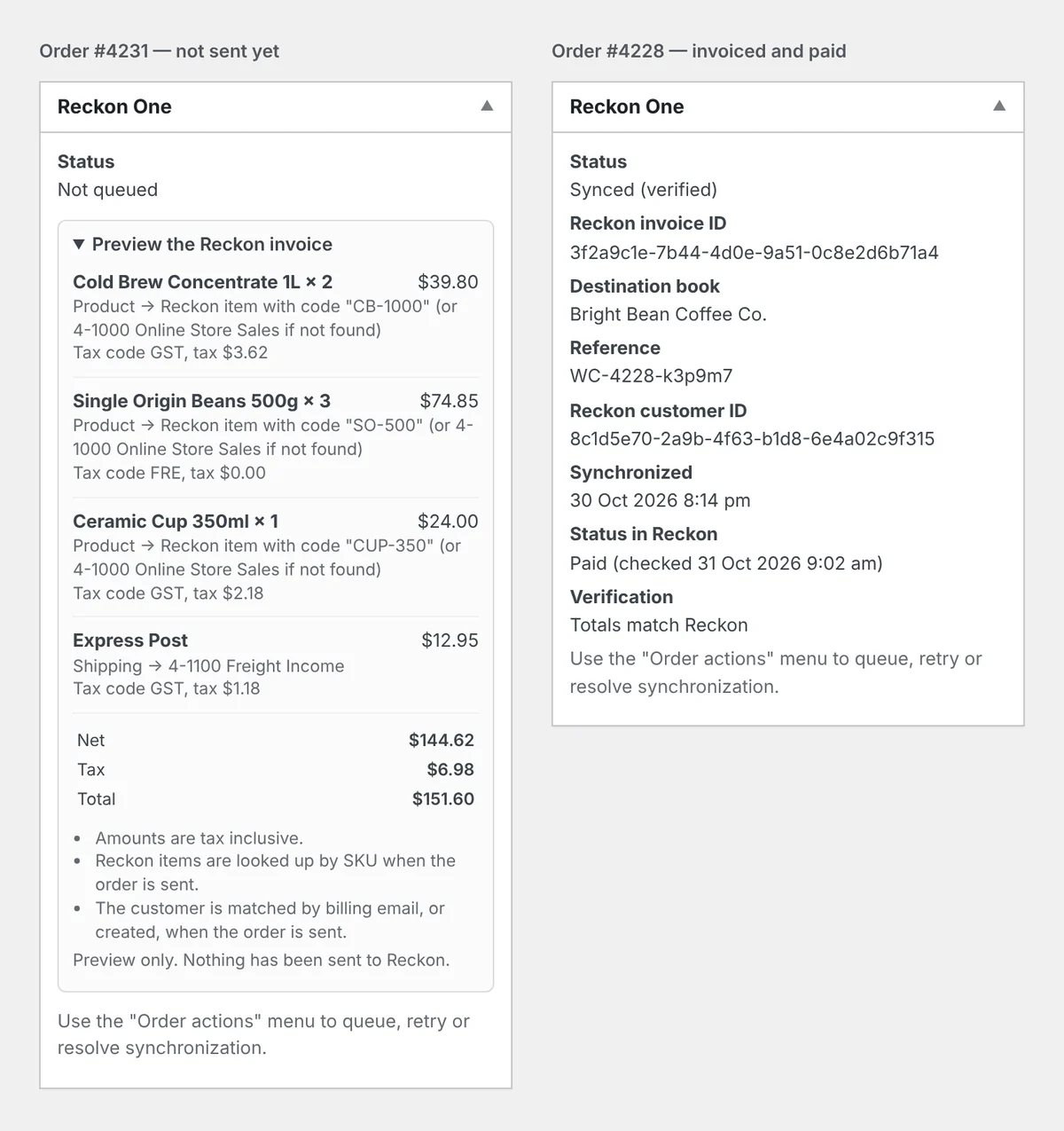
See exactly what an order’s invoice will contain before it is sent, including where each line goes and its tax code.
Send past ordersNew
Pick a date range, see how many orders will be sent, then send them in safe background batches. Already-invoiced orders are skipped.
Paid in ReckonNew
A read-only hourly check shows which orders are paid in Reckon One, with a note on the order. Nothing is changed in either system.
Dashboard and analytics
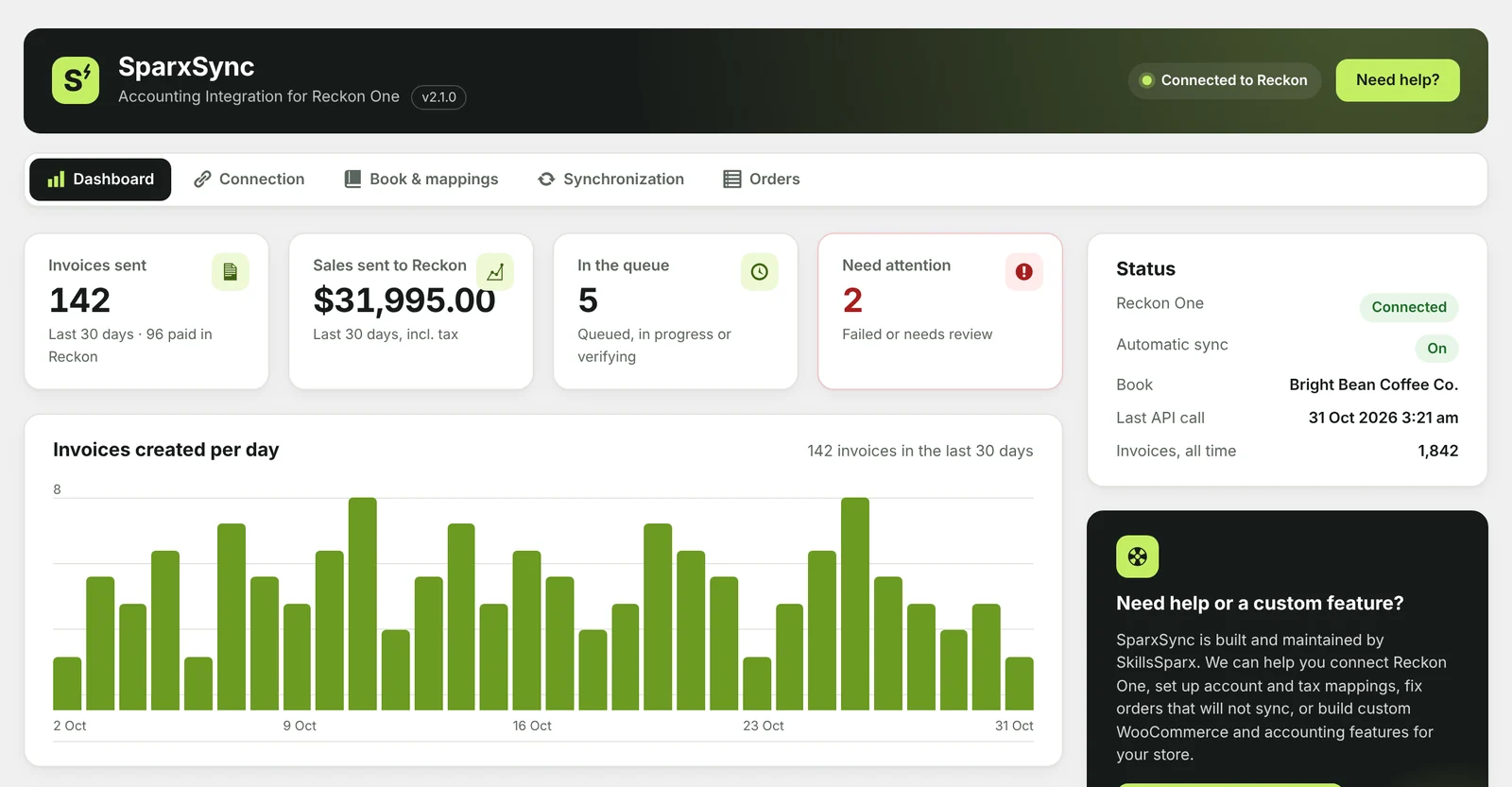
Invoices sent, sales value and a 30-day chart, plus queue health and recent invoices. Calculated from your own store data.
Never slows checkout
Orders are queued with WooCommerce Action Scheduler. No Reckon request happens while a customer is paying.
Clear status for every order
Each order shows its invoice status, and the Orders tab lists anything that failed or needs review, with retry buttons.
Invoice preview
Know what will land in Reckon before it’s sent.
Open any order that hasn’t been sent yet and expand the preview in the Reckon One panel. It uses your saved mappings and never contacts Reckon.
- Each line, and whether it goes to a Reckon item or a ledger account
- The Reckon tax code and tax amount for each line
- Net, tax and total, matched to the order
- Problems such as a missing tax mapping, shown before sending
Account and tax mappings
Your chart of accounts, your GST codes.
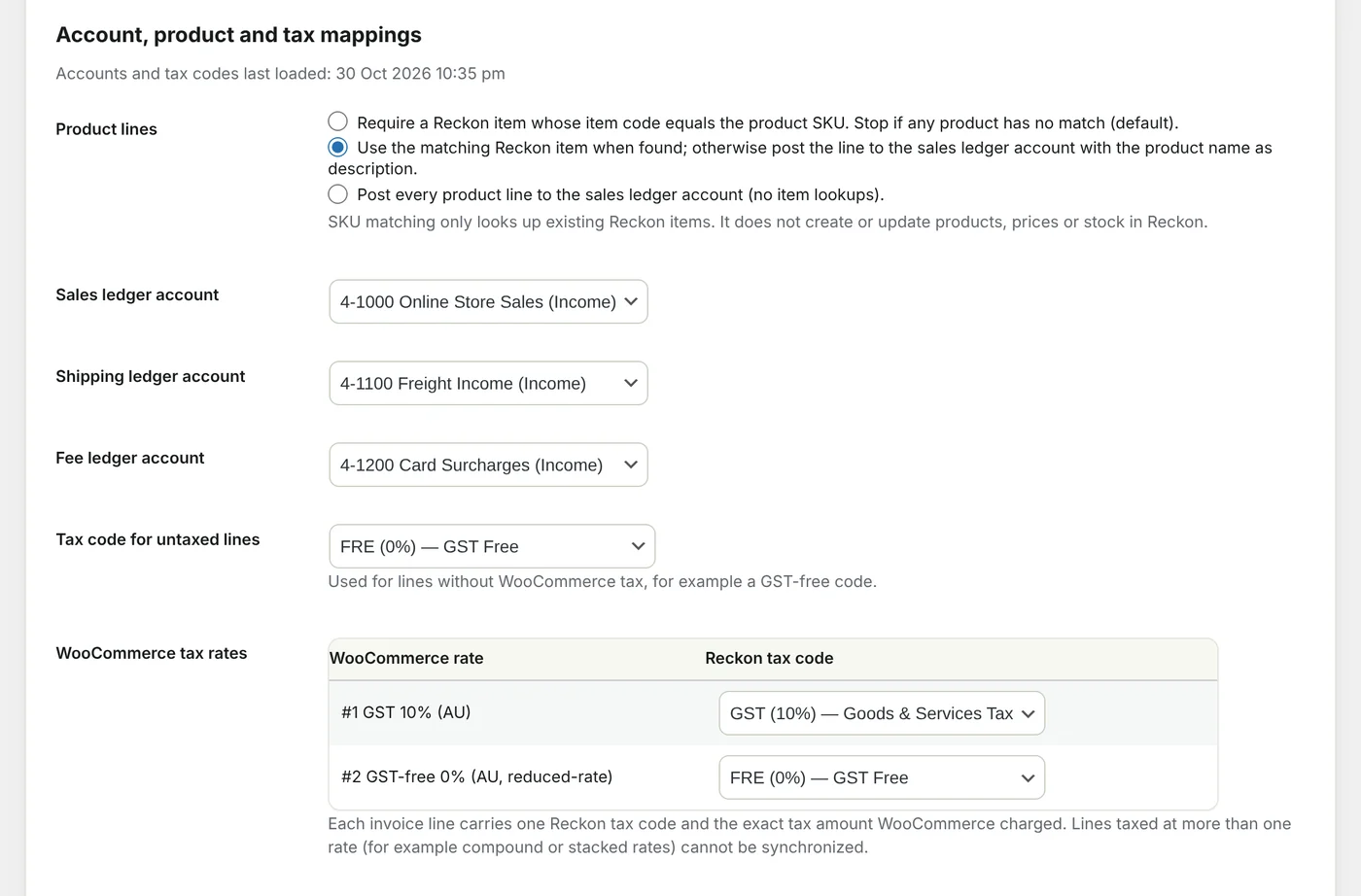
Everything is mapped once, per Reckon book. Choose how product lines are posted, and what happens if a tax rate isn’t mapped.
- Sales, shipping and fee ledger accounts
- Match products to Reckon items by SKU, or post to an account
- Every WooCommerce tax rate mapped to a Reckon tax code
- Billing address sent only if you choose to
Safe by design
It creates invoices. That’s it.
Your accounts stay predictable. The plugin never edits or deletes anything in Reckon One.
What it does
- Creates one Reckon One invoice per eligible order
- Finds or creates the matching Reckon customer
- Lists refunded or cancelled orders for your accountant to review
- Reads back each invoice’s status (Draft, Approved or Paid)
- Keeps credentials, tokens and customer details out of the logs
What it never does
- Post payments or create credit notes
- Change or delete invoices in Reckon One
- Sync products, prices or stock
- Change your WooCommerce order statuses
- Track you or send data anywhere except Reckon
WordPress 6.2+Tested up to 7.1
WooCommerce 8.2+HPOS and legacy storage
PHP 7.4+Any modern host
Reckon OnePlus Reckon developer API credentials
Need a hand?
We’ll set it up for you.
SparxSync is built and maintained by SkillsSparx. If you’d rather not deal with API credentials and tax mappings, our team can do it with you, or build the custom feature your store needs.
- 01Reckon One connection and API credentials
- 02Account, item and GST mappings
- 03Sending your past orders safely
- 04Fixing orders that won’t sync
- 05Custom WooCommerce and accounting features
FAQ
Questions, answered.
Is SparxSync really free?
Yes. The full plugin is free on WordPress.org. There is no paid version, no locked features and no upgrade nags. We only charge if you’d like us to set it up or build something custom for you.
Do I need a Reckon developer account?
Yes. Reckon issues the Client ID, Client Secret and Subscription Key to approved developer partners through the Reckon developer portal. If you need help getting these, we can help.
Which orders are sent to Reckon One?
Only orders that reach the statuses you choose, for example Processing or Completed. Pending, failed, cancelled and refunded orders are never invoiced.
Can it create duplicate invoices?
It is designed to prevent them. Every invoice has a stable reference, the order is marked before an invoice is created, and an unclear result is checked against Reckon before any retry. When something can’t be confirmed, the order is flagged for review instead of guessed.
Can I send orders from before I installed it?
Yes. Choose a date range on the Orders tab, check how many orders will be sent, then send them in background batches. Orders that already have an invoice are skipped, so it’s safe to run more than once.
Does it record payments in Reckon One?
No. It creates invoices only. It can read whether an invoice is paid in Reckon and show “Paid in Reckon” on the order, but payments are still recorded in Reckon as usual.
Does it sync products, prices or stock?
No. SKU matching only looks up items that already exist in Reckon. It never creates or changes products, prices or stock.
Does it work with HPOS?
Yes. It works with WooCommerce High-Performance Order Storage and with legacy order storage.
Let your books keep up with your store.
Install SparxSync for free from WordPress.org, or talk to us and we’ll get it running for you.
Built by SkillsSparx · See all my WordPress plugins →
SparxSync is an independent integration. It is not affiliated with or endorsed by Reckon Limited or WooCommerce.