Last updated: October 24, 2026 · Written by Ameer Hamza, Founder & WordPress Developer at SkillsSparx (6+ years building WordPress websites)
Accounting website development is one of the smartest investments an accounting, CPA, or bookkeeping firm can make in 2026. Most people now find an accountant through a Google search, not a phone book or a referral.
If your website looks outdated, loads slowly, or doesn’t clearly explain your services, potential clients leave in seconds and call the next firm instead.
In this guide, you’ll learn what accounting website development involves, the features every firm needs, how to make your site SEO-friendly, what it costs, and the mistakes to avoid. Whether you’re a solo CPA, a bookkeeping business, or a growing tax firm, this will help you plan a website that wins real clients.
Quick answer: Accounting website development is the process of building a secure, fast, SEO-optimized website for accountants, CPAs, and bookkeeping firms. A good accounting website clearly lists services, shows credentials and reviews, offers online booking and a secure client portal, works perfectly on mobile, and is optimized for local search so new clients can find the firm on Google and AI search tools.
Related guides: law firm website design and WordPress security checklist.
Key Takeaways
- Accounting clients choose firms based on trust, clarity, and security, so your website must show all three.
- Create one page per service (tax, bookkeeping, payroll, advisory) to rank for each service separately.
- Local SEO (Google Business Profile, reviews, consistent NAP) brings most new accounting clients.
- WordPress is the best platform for most accounting firms because of its flexibility and SEO control.
- A typical accounting website takes 3–6 weeks to build and needs ongoing SEO after launch.
Table of Contents
What Is Accounting Website Development?
Accounting website development is the process of planning, designing, building, and optimizing a website specifically for accountants, CPAs, bookkeepers, tax consultants, and financial advisory firms.
It is different from building a generic business website because accounting clients have very specific needs:
- They want to trust you with sensitive financial information.
- They need to quickly see which services you offer (tax filing, payroll, bookkeeping, audits, advisory).
- They often want to book a consultation, upload documents, or contact you securely.
- They search locally, for example “accountant near me” or “tax consultant in [city]”.
Good accounting website development is built around these four needs: trust, clarity, security, and easy contact.
Why Does an Accounting Firm Need a Professional Website?
In short: an accounting firm needs a professional website to build trust, appear in Google and AI search results, generate client leads 24/7, and save staff time through online booking and secure document upload.

1. First impressions build trust
Accounting is a trust-based business. A clean, professional, and secure website tells visitors you are organized and reliable, which is exactly what they expect from someone handling their finances.
2. Clients find you through search engines
When a business owner searches “bookkeeping services for small business” or “CPA for tax return,” Google shows websites that are relevant, fast, and well-optimized. Without proper accounting website development, your firm simply doesn’t appear.
3. It works for you 24/7
Your website answers common questions, explains your pricing approach, and collects leads even when your office is closed. During tax season, that saves your team hours every week.
4. It saves time with automation
Online booking, secure document upload, and client portals reduce back-and-forth emails and phone calls, so you can focus on actual accounting work.
What Features Does Accounting Website Development Need?
In short: every accounting website needs separate service pages, visible credentials and reviews, easy online booking, a secure client portal, HTTPS security, and a mobile-friendly design.
These are the features we recommend for almost every accounting firm website. For a deeper look at design, see our guide to accounting firm website design features.
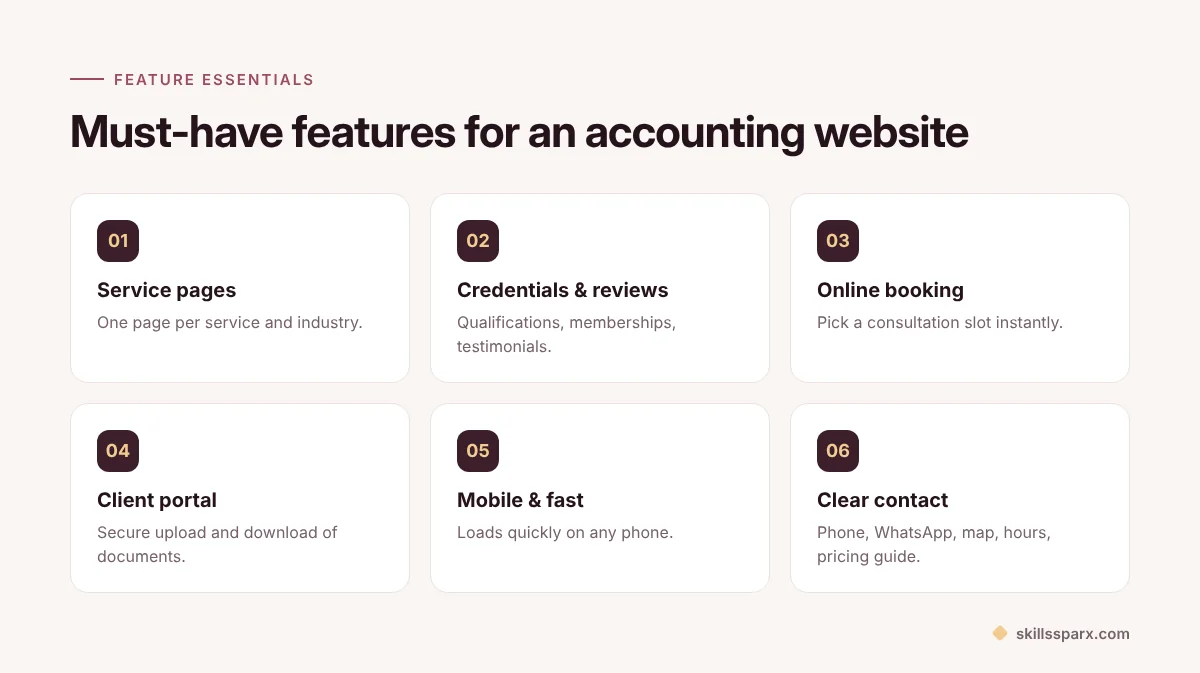
Clear service pages
Create a separate page for each core service: tax preparation, bookkeeping, payroll, audit and assurance, and business advisory. Each page should explain who the service is for, what’s included, and how to get started.
Separate pages also help each service rank in Google for its own keywords.
Strong About and Team pages
Show your qualifications (CPA, ACCA, CA), years of experience, and real photos of your team. People hire people, so this page often gets more visits than you expect.
Easy contact and consultation booking
Add a visible “Book a Free Consultation” button in the header, a simple contact form, your phone number, and a Google Map with your office location. A booking tool or WordPress booking plugin makes scheduling simple.
Secure client portal and file upload
Emailing tax documents is risky. A secure portal lets clients upload files safely and shows them you take data protection seriously.
SSL certificate and security
Your website must run on HTTPS. Add regular backups, a security plugin, strong admin passwords, and keep themes and plugins updated.
Mobile-friendly, responsive design
A large share of visitors will open your site on a phone. Every page, form, and button should be easy to use on small screens.
Testimonials and trust signals
Client reviews, Google review widgets, professional memberships, and logos of software you work with (QuickBooks, Xero, Sage) all increase credibility. According to BrightLocal’s Local Consumer Review Survey 2025, only 4% of consumers say they never read online reviews, so showcasing yours matters.
Helpful resources and a blog
Tax deadline calendars, checklists, and blog posts that answer common questions (“What documents do I need for my tax return?”) attract organic traffic and position you as an expert.
How Do You Make Accounting Website Development SEO-Friendly?
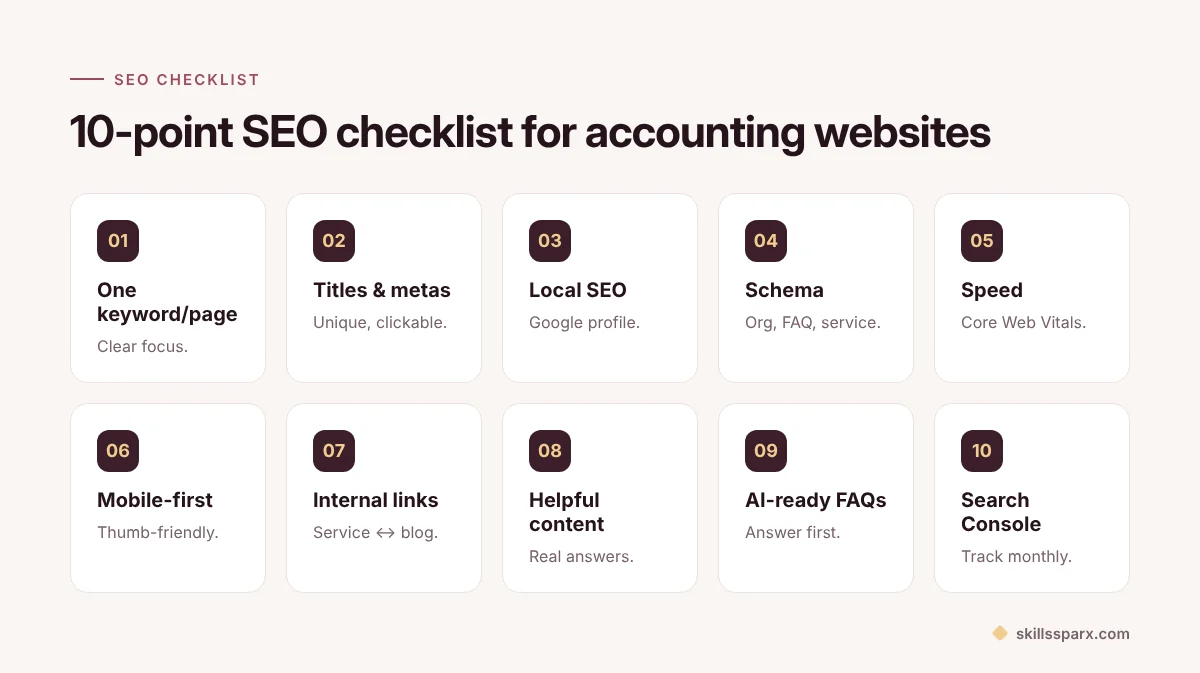
In short: target one keyword per page, optimize titles and headings, build local SEO through your Google Business Profile and reviews, keep the site fast, add schema markup, and publish helpful content regularly.
A beautiful website is useless if nobody finds it. SEO should be part of accounting website development from day one, not added later.
Do proper keyword research
Find what your ideal clients actually search for, such as “small business accountant [city],” “tax preparation services,” or “outsourced bookkeeping.” Map one main keyword to each page.
Optimize on-page elements
- Write a unique SEO title and meta description for every page.
- Use one H1 per page and logical H2/H3 headings.
- Include your main keyword naturally in the first paragraph, headings, and URL.
- Add descriptive alt text to images.
- Link related pages together, for example your bookkeeping page to your payroll page.
Focus on local SEO
Most accounting clients hire locally. Set up and fully complete your Google Business Profile, keep your name, address, and phone number (NAP) consistent everywhere, and ask happy clients for reviews.
If you serve multiple cities, create a dedicated location page for each one.
Improve site speed and Core Web Vitals
Google research found that 53% of mobile visitors leave a page that takes longer than three seconds to load. Use good hosting, compress images, add caching, and avoid heavy page builders where possible. Test your pages with Google PageSpeed Insights and fix issues regularly.
Add schema markup
Structured data such as AccountingService schema, LocalBusiness, and FAQPage helps search engines and AI search tools understand your business, and can improve how you appear in results.
Publish helpful content consistently
Google says its ranking systems prioritize “helpful, reliable information that’s created to benefit people” (Google Search Central). Write in plain language, answer real client questions, and update older posts when tax rules change.
Optimize for AI search (AIO, GEO and AEO)
AI-generated answers are now a major part of search. Google reported in July 2025 that AI Overviews have more than 2 billion monthly users. People ask tools like Google AI Overviews, ChatGPT, and Perplexity questions such as “how do I choose an accountant for my small business?” To appear in these answers, your accounting website should:
- Start each page and section with a short, direct answer to the main question.
- Use question-based headings and a clear FAQ section with FAQ schema.
- Show real expertise: author names, credentials, case studies, and updated dates.
- Keep your business details consistent across your website, Google Business Profile, and directories.
- Use tables and lists for comparisons, prices, and processes so AI can extract them easily.
What Is the Best Platform for Accounting Website Development?
In short: WordPress is the best platform for most accounting firms because it is affordable, flexible, and gives full SEO control. Wix or Squarespace suit very simple sites, while large firms may need a custom build.
- WordPress: The most popular choice. Flexible, SEO-friendly, and supported by plugins like Rank Math for SEO, plus many booking and security tools. Ideal for most firms.
- Webflow: Great for design-focused websites with clean code, though it has a steeper learning curve.
- Wix or Squarespace: Easy drag-and-drop builders for very small firms, but with less control over advanced SEO.
- Custom development: Best for larger firms that need custom client portals, calculators, or integrations.
| Platform | Best for | SEO control | Ease of use |
|---|---|---|---|
| WordPress | Most small and mid-sized accounting firms | Excellent | Moderate |
| Webflow | Design-focused firms | Very good | Moderate to hard |
| Wix / Squarespace | Solo accountants with simple needs | Basic to good | Easy |
| Custom build | Large firms needing portals and integrations | Excellent | Needs developers |
For most firms, WordPress offers the best balance of cost, flexibility, and SEO control.
What Is the Accounting Website Development Process?
In short: the accounting website development process has eight steps: discovery, keyword research, content creation, design, development, on-page SEO setup, testing, and launch with ongoing optimization.
Here is the process we follow (you can see more on our website development process page):
Follow these 8 steps to plan, build, and launch an SEO-friendly accounting website.
Total time
Discovery and planning
Define your target clients, core services, competitors, and goals.
Keyword research and sitemap
Decide which pages you need and which keyword each page targets.
Content creation
Write clear, client-focused copy for every page before design is finalized.
Design
Create a professional, trustworthy layout with clear calls to action.
Development
Build the site and add forms, booking, client portal integrations, and security.
On-page SEO setup
Configure titles, meta descriptions, schema, XML sitemap, Google Search Console, and GA4.
Testing
Check every page on mobile and desktop, test forms, and review speed.
Launch and ongoing optimization
Monitor rankings, publish new content, and keep improving.
For a detailed walkthrough of each stage, read our 9-step accounting firm website development guide.
How Much Does Accounting Website Development Cost?
In short: most accounting firms spend roughly $1,500 to $15,000+ on a website, depending on design, number of pages, and features like client portals.
The cost of accounting website development depends on size, features, and who builds it. As a rough guide:
| Website type | Typical scope | Estimated cost (USD) | Best for |
|---|---|---|---|
| Basic | 5–8 pages, template-based design | $1,500 – $5,000 | New or solo practices |
| Professional | Custom design, service pages, on-page SEO setup | $5,000 – $15,000 | Most small and mid-sized firms |
| Advanced | Client portal, integrations, ongoing SEO | $15,000+ | Large or multi-location firms |
These are typical market estimates; actual pricing depends on your requirements, location, and provider.
Also plan for ongoing costs such as hosting, domain renewal, premium plugins, maintenance, and content. Think of your website as a long-term marketing asset, not a one-time expense.
What Accounting Website Development Mistakes Should You Avoid?
In short: the biggest mistakes are generic content, putting all services on one page, missing calls to action, poor mobile experience, slow speed, weak security, and never updating the site after launch.
- Generic stock content: Copying the same text as every other firm hurts both trust and SEO.
- All services on one page: This makes it hard to rank for individual services.
- No clear call to action: Visitors should always know the next step: call, book, or contact.
- Ignoring mobile users: A site that is hard to use on a phone loses leads.
- Slow loading speed: Heavy images and cheap hosting drive visitors away.
- Weak security: For an accounting firm, a hacked website can seriously damage your reputation.
- “Set it and forget it”: Websites need regular updates, fresh content, and SEO monitoring.
What Do Common Accounting Website Terms Mean?
- Client portal: A secure, password-protected area where clients upload and download financial documents.
- Local SEO: Optimizing your website and Google Business Profile so you appear in searches near your office.
- NAP: Your business Name, Address, and Phone number, which should be identical everywhere online.
- Core Web Vitals: Google’s metrics for loading speed, responsiveness, and visual stability.
- Schema markup: Structured data code that helps search engines and AI tools understand your content.
- AIO / GEO / AEO: Optimizing content so it appears in AI-generated answers such as Google AI Overviews and ChatGPT.
Frequently Asked Questions About Accounting Website Development
How long does accounting website development take?
A standard accounting website usually takes 3 to 6 weeks, depending on the number of pages, features, and how quickly content and feedback are provided.
Is WordPress good for accounting websites?
Yes. WordPress is flexible, affordable, and very SEO-friendly. With the right theme, security setup, and plugins, it is an excellent choice for most accounting and bookkeeping firms.
What pages should an accounting website have?
At minimum: Home, About, individual Service pages, Testimonials, Blog or Resources, FAQ, and Contact or Book a Consultation. An Industries Served page is a useful extra.
Can a website really bring new clients to an accounting firm?
Yes. A well-optimized website that ranks for local and service-based searches can generate a steady flow of consultation requests, especially with a strong Google Business Profile and positive reviews.
Do I need SEO after my accounting website is launched?
Yes. SEO is ongoing. Competitors keep improving, Google updates its algorithms, and tax topics change every year. Regular content and technical checks keep your site visible.
What makes a good accounting website?
A good accounting website is secure (HTTPS), fast, and mobile-friendly, with separate service pages, visible credentials and reviews, a clear “Book a Consultation” button, and helpful content that answers common client questions.
How can my accounting firm appear in AI search results like ChatGPT and Google AI Overviews?
Answer common client questions directly and clearly, use FAQ and LocalBusiness schema, show real expertise and credentials, keep your business details consistent online, and earn reviews and mentions on trusted websites.
Should an accounting website have a client portal?
Yes, if you regularly exchange financial documents with clients. A secure portal is safer than email and makes your firm look more professional.
Can I build an accounting website myself?
Yes, you can build a simple accounting website yourself with WordPress, Wix, or Squarespace. However, a professional developer is usually worth it if you need a client portal, strong security, custom design, or serious SEO results.
How do I get more clients from my accounting website?
Add a clear “Book a Free Consultation” button on every page, create separate service pages, collect Google reviews, publish helpful blog posts, and optimize your Google Business Profile for local searches.
What is the difference between an accounting website and a regular business website?
An accounting website focuses more on trust and data security. It usually needs credentials, secure client portals, document upload, tax resources, and local SEO, which many regular business websites do not require.
Conclusion
Accounting website development is about much more than looking good online. The right website builds trust, explains your services clearly, protects client data, and ranks in search results so new clients can find you.
Focus on clear service pages, strong local SEO, fast performance, security, and genuinely helpful content, and treat your website as a growing asset rather than a one-time project.
Planning a new accounting website or want to improve your current one? Explore our website development services, see examples in our work, or contact our team to discuss a website that brings in real clients.
About the Author
Ameer Hamza is the founder of SkillsSparx, an independent WordPress web development studio based in Pakistan that works with clients worldwide. He has more than six years of experience building business websites, WooCommerce stores, custom plugins, booking workflows, and API integrations.
Sources and References
- BrightLocal – Local Consumer Review Survey 2025
- Marketing Dive – Google: 53% of mobile users abandon sites that take over 3 seconds to load
- TechCrunch – Google’s AI Overviews have 2B monthly users (July 2025)
- Google Search Central – Creating helpful, reliable, people-first content
- Schema.org – AccountingService