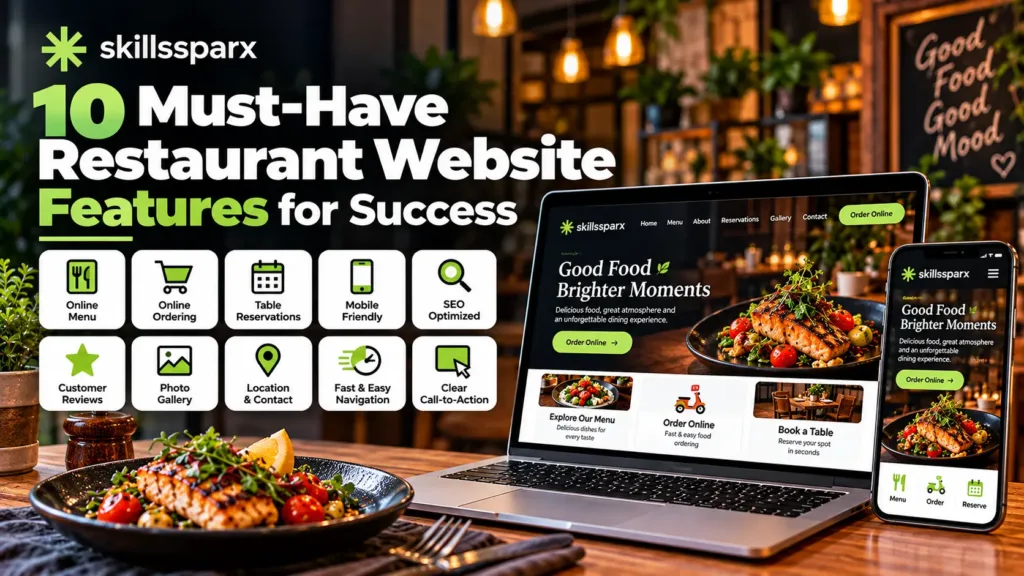
A professional restaurant website is more than just an online menu. It helps customers discover your restaurant, explore your food, make reservations, place orders, find your location, and connect with your business.
The right restaurant website features can improve customer experience, increase online orders, and help your restaurant build a stronger online presence.
In this guide, we will discuss 10 must-have restaurant website features that every restaurant should consider.
What Are Restaurant Website Features?
Restaurant website features are the tools, sections, and functionalities that make a restaurant website useful for customers and easy to manage for the business.
These features can include online menus, food ordering, table reservations, location information, mobile-friendly design, customer reviews, contact details, and more.
A well-designed restaurant website should make it easy for visitors to find information and take action.
10 Must-Have Restaurant Website Features
These restaurant website features can help restaurants provide a better online experience and make it easier for customers to take action.
1. Online Restaurant Menu
An online restaurant menu is one of the most important features of a restaurant website.
Customers should be able to view your menu without downloading unnecessary files or visiting another platform. The menu should clearly show:
- Food and drink names
- Prices
- Descriptions
- Food categories
- Special offers
- High-quality food images where appropriate
A well-designed restaurant website features an easy-to-use online menu that helps customers quickly explore available dishes.
2. Online Food Ordering
Online ordering allows customers to order food directly through your website.
A good ordering system can include:
- Product selection
- Cart functionality
- Delivery or pickup options
- Customer information
- Payment options
- Order confirmation
Direct online ordering can provide a convenient experience for customers while giving restaurants more control over their ordering process.
Modern restaurant website features can make online food ordering faster and more convenient for customers.
3. Restaurant Table Reservation
One of the most useful restaurant website features is an easy table reservation system.
Customers should be able to select a date, time, and number of guests without needing to call the restaurant.
A reservation system can help restaurants:
- Receive bookings online
- Reduce phone calls
- Manage reservations more efficiently
- Provide a better customer experience
The reservation button should also be easy to find on both desktop and mobile devices.
4. Mobile-Friendly Restaurant Website
Mobile-friendly restaurant website features ensure that customers can easily access important information from their smartphones.
Your website should automatically adapt to different screen sizes and make important information easy to access.
The mobile version should provide easy access to:
- Menu
- Ordering
- Reservations
- Phone number
- Location
- Opening hours
- Contact information
A responsive design also creates a more professional impression and makes it easier for customers to interact with your restaurant.
5. Restaurant Location, Hours, and Contact Information
Customers should never have to search through multiple pages to find your restaurant’s basic information.
Your website should clearly display:
- Restaurant address
- Opening and closing hours
- Phone number
- Email address
- Google Maps location
- Delivery area, if applicable
Adding a map can make it easier for customers to find your physical location.
This information is also useful for local SEO because search engines need accurate business information to understand your local presence.
6. High-Quality Food Photos
Food photography can have a major impact on customer decisions.
Professional images can showcase:
- Main dishes
- Desserts
- Drinks
- Restaurant interior
- Special dishes
- Promotional offers
Images should be optimized so they look good without unnecessarily slowing down the website.
Good visual content can make a restaurant website design more attractive and encourage visitors to explore the menu.
7. Customer Reviews and Social Proof
Reviews can help build trust with potential customers.
A restaurant website can showcase genuine customer feedback, ratings, testimonials, or links to relevant review platforms.
Social proof can answer an important question for new visitors:
“Can I trust this restaurant?”
However, restaurants should only display authentic reviews and testimonials.
8. Clear Calls-to-Action
A restaurant website should guide visitors toward useful actions.
Examples of strong calls-to-action include:
- View Menu
- Order Now
- Book a Table
- Contact Us
- Get Directions
- Reserve Your Table
These buttons should be easy to see and understand.
For example, if a visitor wants to order food, they should not have to search through several pages to find the ordering option.
9. Fast and Easy-to-Navigate Design
Website speed and navigation are important parts of a professional restaurant website.
Visitors should be able to quickly find the information they need without waiting for slow pages or dealing with confusing menus.
A good restaurant website design should have:
- Simple navigation
- Fast-loading pages
- Clear headings
- Readable text
- Optimized images
- Mobile responsiveness
- Easy-to-find buttons
A clean structure improves user experience and can also support SEO performance.
If you’re planning a professional website, you can explore our web development services to understand how different website solutions can support your business needs.
10. SEO and Local Search Optimization
A beautiful website is not enough if potential customers cannot find it.
SEO helps your restaurant website appear in search engine results when people search for relevant services and locations.
Important areas include:
- Relevant keyword optimization
- Local SEO
- Page titles and meta descriptions
- Image ALT text
- Internal linking
- Mobile optimization
- Fast page speed
- Local business information
- Helpful website content
For example, a restaurant might target searches related to its location, cuisine, menu, reservations, or food delivery services.
A properly optimized website can help attract customers who are already searching for restaurants like yours.
Using the right restaurant website features can make a website more useful for customers and easier for restaurant owners to manage.
SEO-friendly restaurant website features can help improve visibility and make it easier for potential customers to discover a restaurant online.
What Should a Restaurant Website Include?
In addition to the main restaurant website features, your website should ideally include the following pages:
- Home
- About
- Menu
- Online Ordering
- Reservations
- Gallery
- Contact
- Location
- Blog or News
- Special Offers
The exact structure depends on the restaurant’s business model and requirements.
Restaurant Website Design Matters
Good restaurant website design should combine attractive visuals with functionality.
The website should represent the restaurant’s brand while making it easy for customers to complete important actions.
For example, the homepage could include:
Restaurant Introduction → Featured Food → Menu → Order Now → Reservations → Reviews → Location → Contact
This structure gives visitors important information without making the website difficult to navigate.
How to Create a Restaurant Website
Planning the right restaurant website features before development can help create a better experience for both customers and restaurant staff.
Creating a restaurant website usually involves several important steps.
Step 1: Define Your Requirements
First, decide what the website needs to accomplish.
For example:
- Display the menu
- Accept online orders
- Receive reservations
- Show restaurant information
- Promote special offers
Step 2: Plan the Website Structure
Create the main pages and decide how customers will move between them.
A clear restaurant website development plan can prevent unnecessary changes later.
You can also review our WordPress website development process to understand how a professional website project can be planned and developed.
Step 3: Design the Website
Choose colors, typography, layouts, images, and other design elements that match the restaurant’s branding.
Step 4: Add Important Features
Depending on requirements, developers can add:
- Online menu
- Ordering system
- Reservation system
- Payment integration
- Maps
- Contact forms
- Reviews
- Custom functionality
Step 5: Optimize for SEO and Performance
Before launching, optimize the website for search engines, mobile devices, speed, images, and usability.
Step 6: Test Everything
Test important functions such as:
- Menu links
- Order forms
- Reservation forms
- Contact forms
- Mobile layout
- Buttons
- Navigation
- Payment functionality
Step 7: Launch and Maintain
After testing, the website can be launched. Regular updates should then be made to menus, prices, offers, opening hours, images, and other information.
Why Professional Restaurant Website Development Is Important
Professional development makes it easier to implement restaurant website features that match the specific needs of your business.
A professional website can be customized around the restaurant’s actual business requirements.
Instead of using a basic template with limited functionality, professional restaurant website development can provide features such as custom ordering systems, reservation functionality, payment integrations, SEO optimization, and other business-specific solutions.
You can explore our web development portfolio to see examples of different website projects and solutions.
If your restaurant needs functionality that is not available through standard plugins, custom plugins can also be developed to add specific features.
Restaurant Website vs Social Media
Social media is useful for promoting food, offers, events, and updates, but it should not replace your website.
A restaurant website gives you more control over:
- Your branding
- Menu presentation
- Online ordering
- Reservations
- Customer information
- SEO
- Website content
- Business information
Social media and a website can work together.
Social platforms can bring visitors to your website, while your website can provide the complete information and functionality customers need.
The right restaurant website features can give businesses more control over their online presence, ordering options, reservations, and customer experience.
A website can bring together essential restaurant website features in one place, giving customers a convenient way to interact with the restaurant.
Final Thoughts
The right restaurant website features can make a website more useful for both customers and restaurant owners.
Choosing the right restaurant website features can help a restaurant attract more customers, improve online ordering, and make reservations easier.
Important features include an online menu, online food ordering, table reservations, mobile-friendly design, location information, food photography, reviews, clear calls-to-action, fast navigation, and SEO.
A professional restaurant website should not only look attractive but also make it easy for customers to discover the restaurant, explore the menu, place orders, make reservations, and get in touch.
If you need a professional website solution, you can learn more about SkillsSparx and the services available for businesses.
If you have specific website requirements or need help planning your restaurant website, you can contact our team to discuss your goals and functionality requirements.
You can also visit SkillsSparx to explore professional website development solutions.
Frequently Asked Questions (FAQs)
What are the most important restaurant website features?
The most important features include an online menu, online ordering, table reservations, mobile-friendly design, contact information, location, food images, reviews, clear calls-to-action, and SEO.
Why does a restaurant need a mobile-friendly website?
A mobile-friendly website makes it easier for customers using smartphones to view menus, place orders, make reservations, find directions, and contact the restaurant.
Should a restaurant website have online ordering?
Yes. Online ordering can provide customers with a convenient way to order food directly through the restaurant’s website.
What should a restaurant website menu include?
An online menu should include food names, descriptions, prices, categories, and relevant images. It should also be easy to view on mobile devices.
How can restaurant website design improve customer experience?
Good restaurant website design makes important information easy to find, provides simple navigation, uses clear calls-to-action, loads quickly, and works properly across different devices.
How does SEO help a restaurant website?
SEO can help a restaurant website appear in relevant search results and attract people searching for restaurants, food, menus, reservations, and related services.