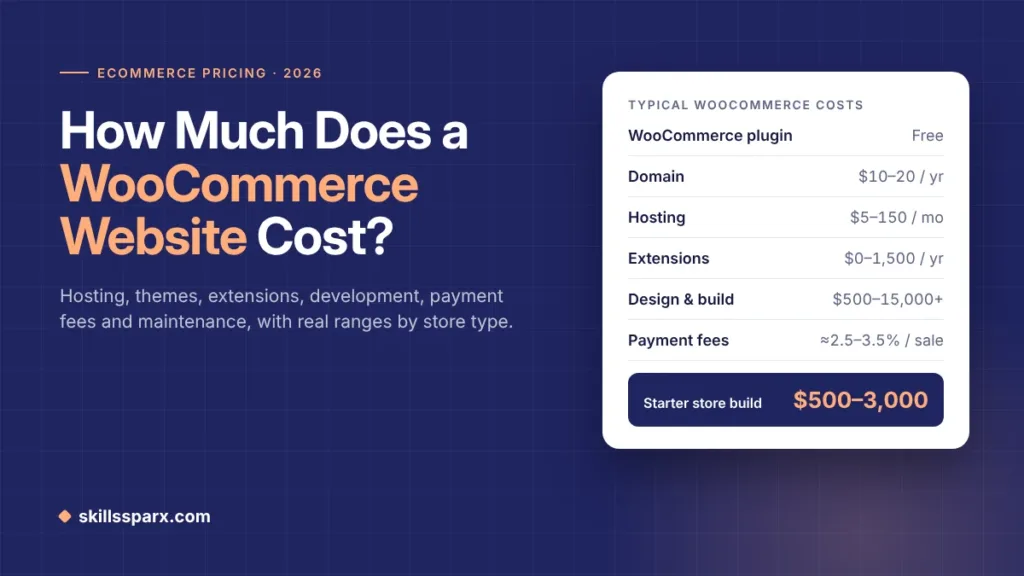
“How much will my WooCommerce store cost?” It’s the first question almost every client asks us, and it’s a fair one. The honest answer is that WooCommerce website cost can be as low as a few hundred dollars or run well past $10,000. It depends on how many products you sell, what features you need and who builds the store.
In this guide, we break down every cost you’ll actually pay, from hosting and themes to payment fees and maintenance, so you can plan a realistic budget and avoid surprises later.
Quick answer: A basic WooCommerce website usually costs around $500 to $3,000 to build, plus roughly $300 to $1,000 a year to run. A growing store with custom design and premium extensions typically costs $3,000 to $10,000, and a fully custom store starts at around $10,000. On top of that, payment gateways usually take about 2.5% to 3.5% of each sale.
Is WooCommerce Free? WooCommerce Pricing Explained
Yes, the WooCommerce plugin itself is free to download and use. That is why WooCommerce pricing can look confusing: there is no single price tag. What you actually pay for is everything around the plugin:
- Hosting and domain to run your store
- A theme, free or premium
- Extensions for features like subscriptions, bookings or advanced shipping
- Design and development if you hire a developer
- Payment gateway fees on each sale
- Maintenance, updates and security
If your store runs on WordPress, our guide to WordPress pricing and website costs explains the hosting and maintenance side in more detail. Still deciding on a platform? Compare WooCommerce vs Shopify.
The Short Version
- The WooCommerce plugin itself is free. You pay for everything around it.
- Your biggest one-time cost is design and development.
- Your biggest ongoing costs are hosting, paid extensions, maintenance and payment fees.
- Starting simple and adding features as you grow is the cheapest smart way to launch.
Table of Contents
How Much Does a WooCommerce Website Cost?
Here’s a quick overview of the typical WooCommerce website cost for each part of a store. These are realistic ranges in US dollars based on common market prices. Your own numbers will depend on your choices.
| Cost item | Typical price | How you pay |
|---|---|---|
| WooCommerce plugin | Free | – |
| Domain name | $10 to $20 | Yearly |
| Hosting | $5 to $150 | Monthly |
| Theme | $0 to $200 (custom design costs more) | One-time or yearly renewal |
| Plugins and extensions | $0 to $1,500 | Mostly yearly |
| Design and development | $500 to $15,000+ | One-time |
| Payment processing | About 2.5% to 3.5% per sale | Per transaction |
| Maintenance and support | $0 to $300 | Monthly |
Is WooCommerce Really Free?
Yes, the core WooCommerce plugin is free to download and use on any WordPress website. You can add products, take orders and accept payments without paying a licence fee.
But a plugin isn’t a store. To get your shop online you still need a domain, hosting, a theme and usually a few extensions. That’s where the real WooCommerce website cost comes from.
Think of it like renting a shop in a market. The shop space might come with no rent for the shelves, but you still pay for the location, the signboard, the lighting, the card machine and someone to keep it clean. WooCommerce works the same way. The software is free, and the costs come from everything you need to run a safe, fast and professional store around it.
WooCommerce Website Cost Breakdown
Let’s go through each cost one by one, with tips on where it’s worth spending and where you can save.
1. Domain Name: $10 to $20 per Year
Your domain is your store’s address, like yourstore.com. A standard .com usually costs $10 to $20 a year. Watch out for cheap first-year deals: renewal prices are often higher, so check the renewal price before you buy.
2. Hosting: $5 to $150 per Month
Hosting is where your store lives, and it has a direct effect on speed, uptime and security. For an online store, this isn’t the place to go as cheap as possible. A slow checkout loses sales.
| Hosting type | Typical cost | Best for |
|---|---|---|
| Shared hosting | $5 to $15/month | New stores with low traffic |
| Managed WordPress hosting | $15 to $50/month | Small stores that want speed and less hassle |
| Managed WooCommerce hosting | $30 to $150/month | Growing stores with steady orders |
| VPS, cloud or dedicated | $100+/month | Large or high-traffic stores |
Most hosts include a free SSL certificate now. If yours doesn’t, make sure you get one, because every store needs HTTPS to take payments safely.
3. WooCommerce Theme: $0 to $200
Your theme controls how your store looks. You have three options:
- Free themes: good, lightweight free themes work well for many small stores.
- Premium themes: usually $30 to $200, often with a yearly renewal for updates and support.
- Custom design: a design made just for your brand. It costs more but helps you stand out and convert better.
Our advice: choose a fast, well-coded theme over a flashy one packed with features you’ll never use. Heavy themes slow down your store.
4. Plugins and Extensions: $0 to $1,500 per Year
Extensions add features WooCommerce doesn’t include by default. Many are free, but popular premium ones often cost between about $50 and $300 a year each. Common examples include:
- Subscriptions and memberships
- Bookings and appointments
- Product add-ons and custom options
- Advanced shipping and live carrier rates
- Wishlists, filters and product search
- SEO, security, backups and caching
A small store might only need three to five paid extensions. A bigger store can easily need ten or more. If no ready-made plugin does exactly what you need, custom plugins can be a cleaner and faster option than stacking several plugins together.
5. Design and Development: $500 to $15,000+
This is usually the biggest part of your WooCommerce website cost. The price depends mostly on who builds your store and how custom it needs to be.
| Option | Typical cost | Good to know |
|---|---|---|
| Do it yourself | $0 + your time | Cheapest, but slow if you’re new to WordPress |
| Freelancer | $500 to $5,000 | Quality varies a lot, so check past work |
| Agency | $3,000 to $15,000+ | Full team, clear process, ongoing support |
Development usually covers store setup, page design, product templates, checkout setup, payment and shipping configuration, mobile optimisation, speed work and basic on-page SEO. You can see how we handle each stage in our WooCommerce website development process.
6. Product Setup: $0 to $1,000+
Someone has to add your products: titles, descriptions, prices, images, categories, variations (like size and colour) and stock levels. With 20 products you can do this yourself in a day or two. With 1,000 products, you’ll probably want a bulk CSV import or paid help.
Don’t rush product descriptions. Clear, original descriptions help customers decide and help your products rank on Google.
7. Payment Gateway Fees: About 2.5% to 3.5% per Sale
Payment gateways such as WooPayments, Stripe and PayPal usually don’t charge a monthly fee for online payments. Instead, they take a percentage of each sale, often plus a small fixed fee per transaction. Rates vary by country, card type and currency, and international cards usually cost a bit more.
Example: if you sell $5,000 a month and your gateway averages 3%, you’ll pay around $150 a month in fees. It’s a real cost, so include it in your pricing.
8. Shipping Costs
WooCommerce lets you set flat rates, free shipping or weight-based rates for free. If you want live rates from carriers, printed labels or shipment tracking, you’ll often need a paid extension or a shipping app. Then there’s the cost of shipping itself, packaging included, which you should factor into your product prices.
9. Maintenance and Security: $0 to $300 per Month
A WooCommerce store isn’t “build once and forget”. WordPress, WooCommerce, your theme and plugins all need regular updates. You also need backups, security monitoring and someone to fix things when an update breaks something.
- DIY maintenance: free, but expect a few hours a month.
- Maintenance plan: usually around $50 to $300 a month, depending on what’s included.
Skipping maintenance is the most expensive way to save money. A hacked or broken checkout costs far more than a care plan.
10. Marketing and SEO
A store with no visitors makes no sales. Budget something for SEO, content, email marketing or ads, even if you start small. If you sell locally too, our guide on local SEO for small businesses shows how to get found by nearby customers for free.
WooCommerce Website Cost by Store Type
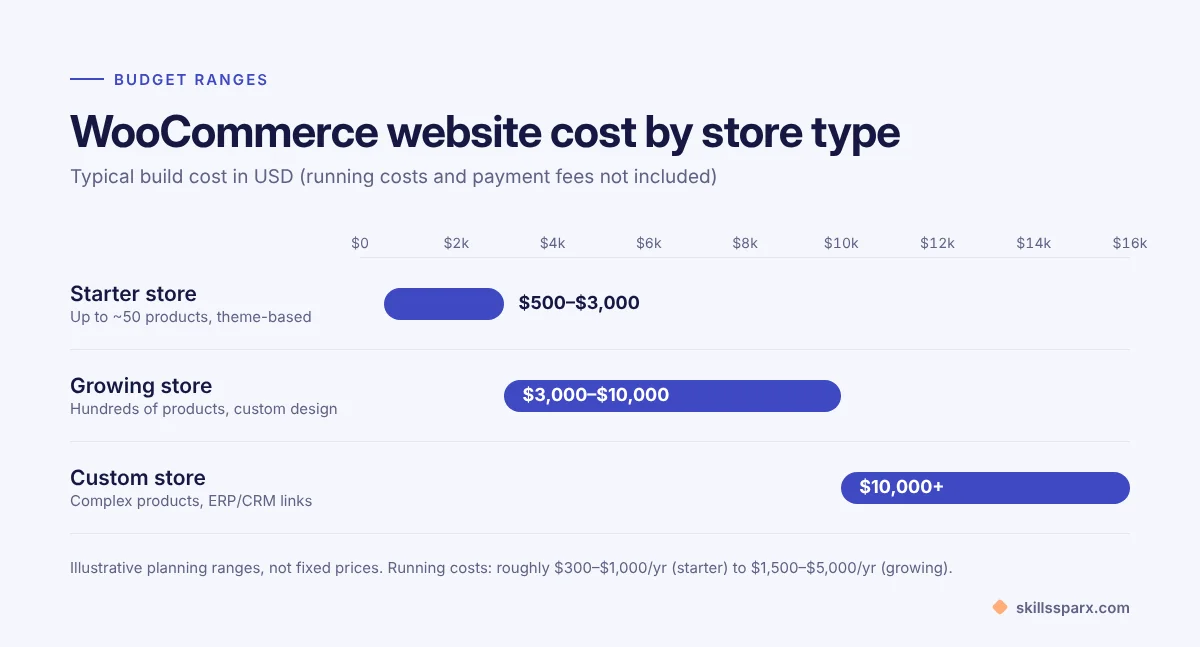
Every store is different, but most fall into one of these three groups.
Starter Store: $500 to $3,000
Good for new businesses selling a small range of products. You’d use a free or premium theme, affordable hosting, standard checkout and a few free plugins. Running costs are usually around $300 to $1,000 a year.
Growing Store: $3,000 to $10,000
For businesses with hundreds of products and regular orders. Expect a customised design, managed hosting, premium extensions, shipping and tax rules, and better speed optimisation. Running costs are often $1,500 to $5,000 a year.
Custom Store: $10,000 and Up
For large catalogues, complex products or stores connected to other systems like an ERP, CRM or inventory software. These stores need custom design, custom plugins, high-performance hosting and ongoing development.
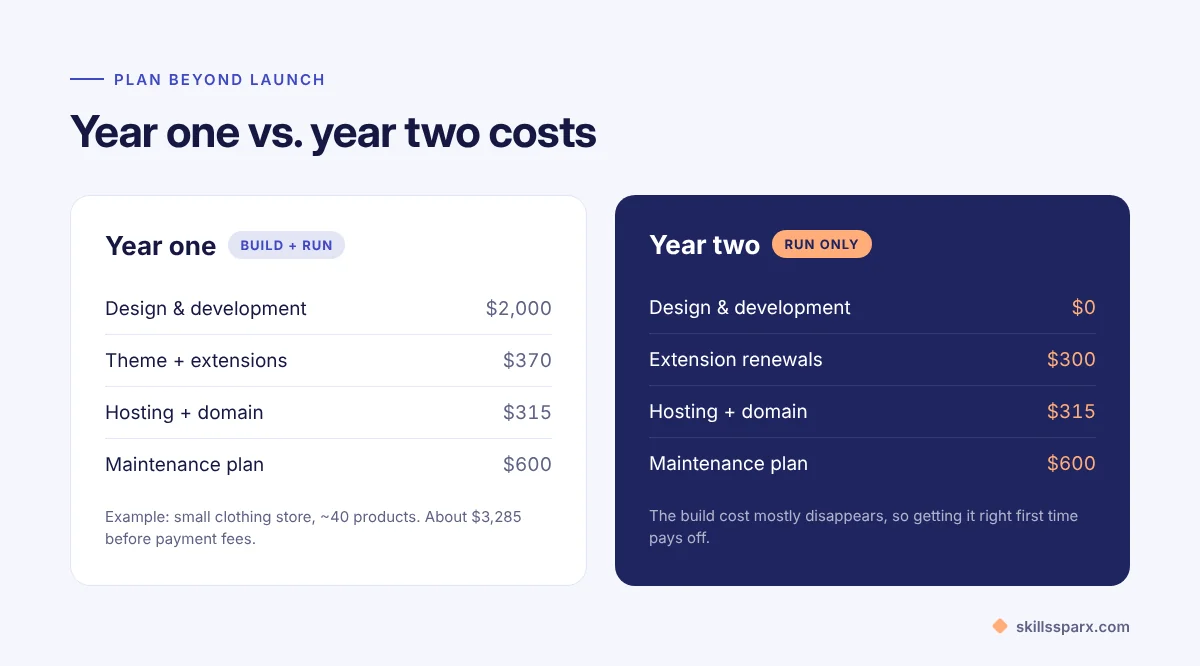
Example: First-Year WooCommerce Website Cost for a Small Store
Numbers make more sense with a real-world picture, so let’s walk through a typical example. Imagine a small clothing brand launching with around 40 products. The owner hires a freelancer or small agency for the build, uses a premium theme, and adds a few useful extensions.
| Item | Example cost (year one) |
|---|---|
| Domain name | $15 |
| Managed WordPress hosting ($25/month) | $300 |
| Premium theme | $70 |
| Paid extensions (3 to 4) | $300 |
| Design and development | $2,000 |
| Basic maintenance plan ($50/month) | $600 |
| Total before payment fees | about $3,285 |
If this store sells $3,000 a month and pays around 3% in payment fees, that adds roughly $1,080 over the year. So the realistic first-year WooCommerce website cost for this store is a little over $4,000.
Here’s the encouraging part. In year two, the development cost mostly disappears. The owner only pays for the domain, hosting, renewals, maintenance and payment fees, so the yearly cost drops a lot. That’s why it’s worth getting the build right the first time instead of rebuilding a cheap store a year later.
Your numbers will be different, of course. A store that does everything itself might spend under $1,000 in year one. A store with custom features might spend $15,000 or more. The point is to plan for both the one-time build and the yearly running costs, not just the launch price.
Where It’s Worth Spending More
- Hosting: a fast store converts better, and speed is a ranking factor.
- Checkout experience: a smooth, simple checkout directly affects how many visitors complete their order.
- Security and backups: one bad day without a backup can wipe out months of savings.
- Product photos and descriptions: these sell your products when you’re not there to explain them.
Where You Can Safely Save
- Fancy animations and effects that look nice but slow pages down.
- Extensions you “might need later”. Add them when you actually need them.
- Premium versions of plugins when the free version already covers your needs.
Hidden Costs Most Store Owners Forget
These are the costs we see new store owners miss most often:
- Renewals: domain, theme and plugin licences renew every year, often at a higher price.
- Payment fees on every single order, including refunds in some cases.
- Product photography and copywriting.
- Email service for newsletters and abandoned cart emails as your list grows.
- Hosting upgrades when traffic increases.
- Developer time for small changes after launch.
- Cost of goods: what you pay to buy or make your products. It isn’t a website cost, but it decides whether your store is actually profitable.
How to Reduce Your WooCommerce Website Cost (Without Cutting Corners)
- Start with what you need on day one. Launch with core features and add extras when sales justify them.
- Pick a lightweight theme instead of paying for a big multipurpose theme.
- Avoid plugin overload. Every plugin adds cost, update work and a bit of load time.
- Buy hosting for the store you have now, with an easy upgrade path for later.
- Add products yourself if you have time, and let your developer handle the technical setup.
- Get a clear, written quote so you don’t pay for surprise extras.
What Should a WooCommerce Website Quote Include?
Before you hire anyone, make sure the quote clearly lists:
- Number of pages and product templates
- Theme or custom design work
- Payment gateway and shipping setup
- Which plugins are included and who pays for licences
- Number of products uploaded
- Mobile optimisation and speed work
- Basic SEO setup, such as titles, meta descriptions, sitemap and schema
- Training, launch support and what happens after launch
Looking at a developer’s past stores tells you more than any price list. You can browse our web development portfolio to see real examples.
WooCommerce vs Shopify: Which Costs Less?
Shopify charges a monthly subscription that includes hosting, and many features come from paid apps. WooCommerce has no subscription, but you pay for hosting, extensions and maintenance yourself.
In simple terms, Shopify is often easier at the start, while WooCommerce usually gives you more control and can cost less over time, especially if you want custom features, full ownership of your site and no platform lock-in.
FAQs About WooCommerce Website Cost
How much does a basic WooCommerce website cost?
A basic WooCommerce website usually costs about $500 to $3,000 to build, depending on the design and who builds it. After launch, expect roughly $300 to $1,000 a year for hosting, domain, plugins and basic upkeep, plus payment fees on each sale.
Is WooCommerce cheaper than Shopify?
WooCommerce can be cheaper over time because there is no monthly platform subscription and you own your site. However, you pay for hosting, extensions and maintenance yourself, so the real cost depends on the features you need.
Are there monthly fees for WooCommerce?
WooCommerce itself has no monthly fee. Your regular costs come from hosting, paid extension renewals, maintenance and payment processing fees.
How much does it cost to maintain a WooCommerce website?
You can maintain a store yourself for free if you have the time. A professional maintenance plan usually costs around $50 to $300 a month and covers updates, backups, security and small fixes.
How long does it take to build a WooCommerce website?
A simple store can be ready in about two to four weeks. A growing or custom store with special features can take six to twelve weeks or longer.
Can I build a WooCommerce store myself?
Yes. Many small business owners set up a basic store themselves using a theme and the free WooCommerce plugin. Hiring a developer makes more sense when you need custom design, advanced features, better speed or simply want to save time.
Final Thoughts
There’s no single price tag for a WooCommerce store, but now you know where the money goes. Plan for the one-time build, the yearly running costs and the payment fees on every sale, and you’ll have a budget you can actually trust.
If you’re not sure what your store needs, start small, launch, and grow from there. That’s what most successful stores do.
Want an exact WooCommerce website cost for your project? Take a look at our WooCommerce development services, read more about SkillsSparx, or contact our team for a free, no-pressure quote.

Discussion